By Camille G., jewellery maker since 2013 and full-stack developer, founder of Loch Ness Paris · Updated 14 October 2026
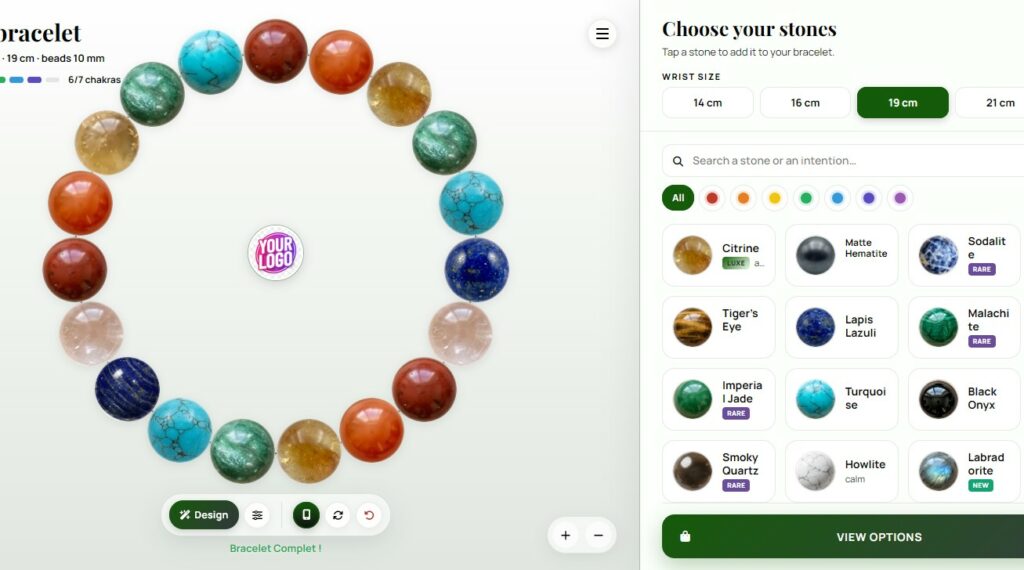
Customers love to compose their own bracelet: they pick the stones that speak to them, change their mind, try another colour. A crystal bracelet builder brings that experience to your website. But the tools on the market look alike at first glance, and the differences only show once your customers start using them. This guide gives you eight concrete criteria to test any builder before you commit.
Transparency first: I design and string bracelets in my Paris workshop, and I also built one of these tools, the Loch Ness bracelet configurator. I present it in its own section below, clearly labelled. The criteria themselves apply to any tool, including ours.
Key takeaways
- Real stone photos sell real stones: check how the beads are shown before anything else.
- Ask who provides the bead images: photographing and cutting out dozens of stones is weeks of work.
- A true white label shows your name, logo and colours, with nothing that sends your customers elsewhere.
- Check that the tool works on your website platform, not only on one e-commerce system.
- Stone meanings add value, as long as they are presented as traditions, never as health promises.
Why shops add a bracelet builder
A product page shows a finished bracelet. A builder lets the customer create one: they spend more time with your stones, they feel ownership of the result, and they often share it. The demand from merchants is real: on the Shopify Community forum, a shop owner asked for an app that lets customers build crystal bracelets bead by bead with a live preview, and the replies show how quickly a simple idea turns into custom development or thousands of variant images.
That is why the choice of tool matters. Here is what I check, as a jeweller and as a developer.
The 8 criteria to check
1. Real stone photos or graphic renderings?
A natural stone is never uniform: veins, inclusions, colour variations, a matte or glossy surface. A drawn or generated bead can look neat, but it does not show what the customer will actually wear, and the gap appears when the bracelet arrives. Run this simple test on any builder:
- Zoom in on a bead: do you see the texture and inclusions of a real stone?
- Compare two stones that look alike, such as sodalite and lapis lazuli: can you tell them apart as you would in your hand?
- Look at the light: real photos show natural reflections; renderings often repeat the same highlight on every bead.
2. Who provides the bead images?
Many configurators are empty frames: you upload your own images. That gives you control, but it also means photographing every stone in the same light, cutting out each bead and resizing everything. For a catalogue of 40 to 60 stones, count several days of work. Ask whether the tool comes with a ready-made library, and whether you can still hide the stones you do not sell.
3. Is it a true white label?
Your customers should feel they are on your website, from the first bead to the order. Check that you can set your shop name, your logo and your colours; that the links in the menu bring customers back to your pages; and that no third-party brand appears unless you choose to show it.
4. Does it work on your website?
Some tools are apps for one e-commerce platform only. If your shop runs on WordPress, Wix, Squarespace or a custom site, look for a tool you can add with a link or a standard embed (an iframe, which every website builder accepts in an HTML block), or with a one-line script for a floating button.
5. Your catalogue, your prices
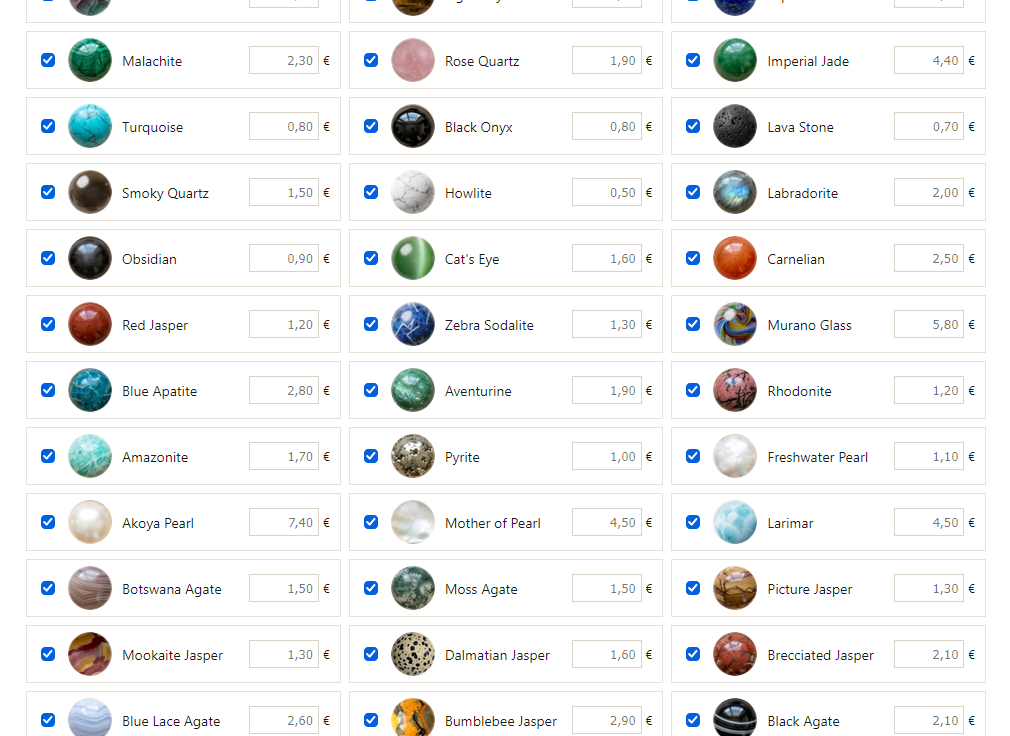
You should be able to choose which stones appear and set your own price per bead, with the total updating live for the customer. Also check the size options: wrist sizes and bead diameters should match what you actually string.
6. How do orders reach you?
Two models exist. An integrated checkout turns the design into a cart line in your e-commerce system. An order request sends you the full composition by email, and you confirm, take payment and ship as you usually do. The first is more automated; the second works on any website and leaves room for a personal exchange with the customer. In both cases, the exact sequence of beads must reach you, so the bracelet is strung as designed.
7. Does the tool know the stones?
Customers who buy natural stone bracelets often choose them for their meaning: calm, protection, love, confidence. A builder that explains each stone, lets customers search by intention and shows how their stones work together adds something a product page cannot. It must stay honest: lithotherapy is a tradition, and crystal healing has no scientific evidence behind it. Prefer tools that say what a stone is traditionally associated with, never that it heals or cures. It protects your customers, and it protects you.
8. Languages, phones and setup time
Most customers will open your builder on a phone: test it there first. If you sell abroad, check which languages are available. Finally, ask how long setup takes and whether you can change your settings yourself, without waiting for a developer.
Comparison by type of solution
Tools change quickly, so this table compares types of solutions rather than brands. Use the eight criteria above to check any specific tool for yourself.
| Criterion | E-commerce platform app | Generic product configurator | Custom development | Loch Ness configurator |
|---|---|---|---|---|
| Bead images | Usually your own images | Your own images or 3D models | Whatever you commission | Library of real stones photographed in our workshop |
| Image preparation | By you | By you or a provider | By you or your agency | Done (58 beads ready and more on demand) |
| Websites supported | That platform only | Varies | Yours | Any site: link, iframe or floating button |
| White label | Varies by app | Varies | Full | Name, logo, colours, menu, frame |
| Orders | Integrated checkout | Varies | As built | Order request by email (Stripe on-demand) |
| Stone meanings and chakras | Rarely | No | If you write them | Built in, with a composition score |
| Languages | Varies | Varies | As built | English, French, Spanish and (all lang on-demand) |
| Setup | Install the app, then upload images | Configure the product model | Weeks to months | Minutes, from a client area |
Our approach: the Loch Ness bracelet configurator
This section presents our own tool. You can test everything described here on the live configurator.
[IMAGE : capture of the configurator on a computer, real stones visible, a bracelet half composed · file: loch-ness-crystal-bracelet-builder-desktop.webp · alt: “Crystal bracelet builder with real photographed stones: bracelet on the left, stone cards on the right”]
Real stones, photographed in our workshop
Every bead in the configurator is a photo of a real bead from my workshop: 58 references, mostly natural stones (rose quartz, lapis lazuli, labradorite, tiger’s eye, moonstone, turquoise…), plus pearls, lava stone and Murano glass. Each one is photographed and cut out by hand, so the customer sees the actual texture and colour of the stone. Shops simply untick the stones they do not sell.
A white label each shop configures itself
Each shop gets a client area, in English, French or Spanish, where everything is set without technical skills:
- Identity: shop name and logo, shown in the centre of the bracelet and on the share card.
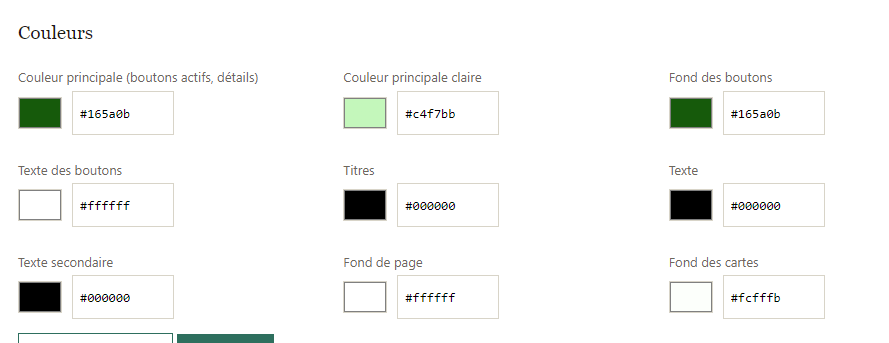
- Nine colours: main colour, buttons, titles, text, backgrounds; shades are calculated automatically.
- Catalogue and prices: show or hide each stone, set your price per bead.
- Menu: up to eight links back to your own pages.
- Orders: order requests go straight to your mailbox through a free Web3Forms key.
- Four ways to add it: direct link, full-page iframe, compact iframe for a column, or a floating button you switch on and off.
- Frame: a discreet border around the embedded tool, with colour, thickness, corner radius, shadow and margin, previewed live.
One save updates the three languages at once.
What your customers can do
- Choose a wrist size from 14 to 23 cm and a bead size of 8 or 10 mm; the number of beads adapts.
- Add stones one by one and watch them take their place on the bracelet; tap a bead to remove it, with an Undo button.
- Search by stone or by intention (“love”, “calm”, “protection”), filter by chakra or by price.
- Get ideas with Design: a random harmonious pattern or ready-made palettes.
- See the live total price, then send the order request with the exact bead sequence.
- Use it on a phone with a layout made for one thumb, or on a computer with the bracelet and the stones side by side.
The composition score: stones, chakras and elements
This is the heart of the tool. When the bracelet is complete, the configurator calculates a score out of 100 from the traditional associations of each stone, and gives the bracelet a name, from “Harmonic Bracelet” to “Bracelet of Power” or “Alchemical Bracelet”. Two modes are available:
- Energetic: how well the stones’ traditional properties go together, how many of the seven chakras are represented, and how the five elements are balanced.
- Aesthetic: the harmony of colours and the balance of the composition.
The panel also lists the composition, the main intentions, and practical care notes, for example which stones should not go in water. Customers can copy their composition or download a share card. All texts say what stones are traditionally associated with; the score is a source of inspiration, not a promise.
[IMAGE : capture of the score panel, real stones · file: crystal-bracelet-lithotherapy-score.webp · alt: “Composition score of a crystal bracelet: score out of 100, chakras and stones used”]
Our current limits
- Orders arrive as email requests: there is no integrated checkout yet.
- Prices are shown in euros only for now.
- Three languages: English, French and Spanish.
- The stone library is ours: adding a stone of your own requires a custom list, on request.
A tool rooted in a larger, holistic approach
The configurator is not a standalone gadget. It is one part of a set of free tools I built around the same stone knowledge, all written and maintained by me:
- Stone of the Day: a daily stone chosen by intention, by life path number, by moon phase or by zodiac season.
- Crystal meanings A–Z: a page for each stone, with its traditional associations, chakras and care.
- The creations gallery: bracelets composed by visitors, reviewed before publication.
The same data feeds all these tools: when I refine the description of a stone, the configurator, its score and the Stone of the Day benefit together. For a shop, it means the meanings your customers read are consistent, maintained and written with the same care. These companion tools are Loch Ness services; shops receive the configurator in their own brand.
Checklist before you choose
- ☐ I zoomed in on several beads and saw real stones.
- ☐ I know who provides and prepares the bead images.
- ☐ My name, logo and colours appear everywhere, with no other brand.
- ☐ The tool works on my website platform.
- ☐ I can choose my stones and set my prices.
- ☐ I placed a test order and received the exact bead sequence.
- ☐ Stone meanings are worded as traditions, not health promises.
- ☐ I tested it on my phone, in my customers’ language.
Frequently asked questions
What is a crystal bracelet builder?
It is an online tool that lets customers design a bracelet bead by bead: they choose a size, add stones, see the bracelet take shape and send it to the shop, which strings it by hand.
How can I tell real stone photos from renderings?
Zoom in on a bead and compare two similar stones. Real photos show inclusions, natural colour variations and different reflections; renderings tend to look uniform, with the same highlight repeated on every bead.
Can I add a bracelet builder to a WordPress or Wix site?
Yes, if the tool offers a link, an iframe or a script. In WordPress, paste the iframe in a “Custom HTML” block; in Wix, use “Embed code”. Platform-specific apps, by contrast, only work on their own platform.
Is the lithotherapy score scientific?
No. It reflects how well the stones go together according to the meanings traditionally given to them, and the balance of colours. It is designed for inspiration and pleasure, not as medical advice.
Can I try the Loch Ness configurator before deciding?
Yes. You can test the public version right now, and we can prepare a free demo in your colours with your logo, with no commitment.
See it with your own stones in mind
The best way to judge a builder is to use it. Try ours, zoom in on the beads, compose a bracelet and read its score. If you like it, we will prepare a demo in your colours.