
Pentru magazine · Shopify
Adaugă un constructor de brățări la Shopify-ul tău
Permiteți-i clienților dvs. să-și proiecteze bratara din cristal pe magazinul dvs. Shopify cu o singură secțiune Custom Liquid. Nimic de instalat, nimic de întreținut.
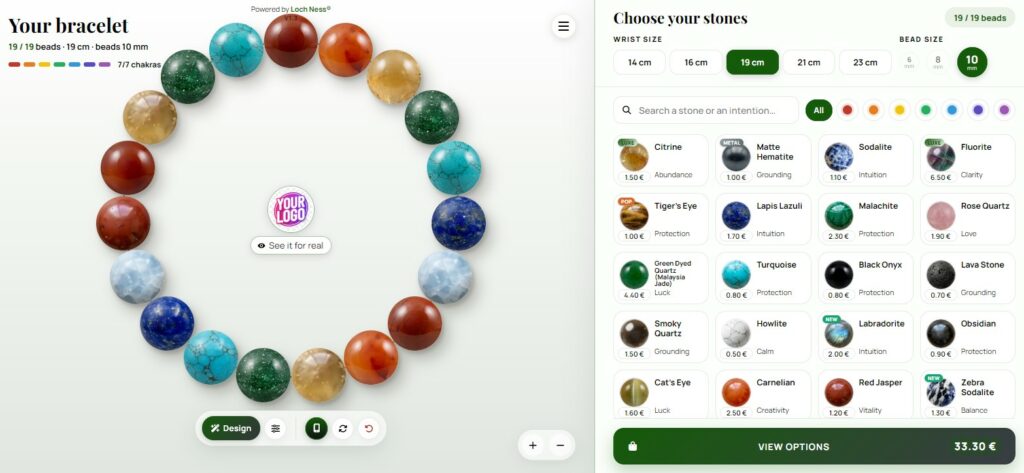
Vânzi brățări din piatră și vrei ca clienții tăi să-și proiecteze propriile brățări, direct din magazinul tău Shopify? Poți face asta fără să instalezi o aplicație și fără să atingi codul temei tale. Acest ghid arată patru moduri de a adăuga constructorul de brățări Loch Ness, de la un simplu link de meniu până la un buton plutitor pe fiecare pagină, pas cu pas.
Înainte de a începe
Constructorul rămâne găzduit pe serverele noastre și apare în magazinul tău. Obții întotdeauna cea mai recentă versiune, fără să trebuie să faci actualizări din partea ta. Ai nevoie de două lucruri:
- al tău identificator, trimis de Loch Ness atunci când constructorul dvs. este configurat (de exemplu
my-shop); - un Tema Online Store 2.0, care acoperă toate temele Shopify recente, inclusiv Dawn.
Numele tău, logo-ul, culorile, meniul, prețurile, moneda și alegerea pietrei sunt legate de identificatorul tău. Le modifici din zona client, iar ele se actualizează peste tot în același timp, fără a mai atinge Shopify.
YOUR-IDENTIFIER.Care opțiune ar trebui să alegi?
| Opțiune | Cel mai bun pentru | Timp |
|---|---|---|
| 1. Legătura de meniu sau buton | Cel mai simplu: constructorul deschide pagina completă | 2 min |
| 2. Pagină dedicată | O pagină "Designează-ți brățara" din interiorul magazinului tău | 5 min |
| 3. Buton plutitor | Un buton pe fiecare pagină a magazinului tău | 5 min |
| 4. Constructor compact | O coloană sau o pagină de produs | 5 min |
Puteți să le combinați. Multe magazine folosesc o pagină dedicată și adaugă o legătură la ea în meniul principal.
Opțiunea 1: un link în meniu sau un buton gata-făcut
Fără niciun cadru, constructorul deschide pagina completă, în culorile tale. Asta îi oferă cel mai mult spațiu, mai ales pe telefoane.
- Adaugă-l la meniu. În panoul de administrare Shopify, accesați Magazin Online → Navigare, deschideți meniul principal și faceți clic Adăugare element meniu.
- Denumiți-o și lipiți adresa. Denumiți-o, de exemplu "Designează-ți brățara", apoi lipiți această adresă în câmpul Link:
https://lochness-paris.com/pwa/en/?client=YOUR-IDENTIFIERPentru a afișa un buton pe pagina dvs. de pornire sau într-o descriere de produs, utilizați buton gata-făcut din zona dvs. de client. Utilizează deja culorile dvs.
Opțiunea 2: o pagină dedicată "Proiectează-ți brățara"
- Creează pagina. În panoul de administrare, accesați Magazin Online → Pagini → Adăugare pagină. Dă-i un titlu („Creează-ți brățara") și salvează.
- Creați un șablon de pagină. Du-te la Magazin Online → Teme → Personalizare. În meniul derulant din partea de sus a editorului, alegeți Pagini, apoi Creare șablon. Numește-l, de exemplu
bracelet-builder. - Adăugați o secțiune Liquid personalizată. În acest șablon, faceți clic Adăugare secțiune și alege Lichid Personalizat.
- Lipește codul. Lipiți codul de mai jos în câmpul Custom Liquid și salvați.
- Atribuiți șablonul. Înapoi la Magazine Online → Pagini, deschideți pagina și alegeți
bracelet-builderîn Șablon câmp. Salvează. - Adaugă-l la meniu. În Magazin Online → Navigare, adaugă un element de meniu care să indice spre această pagină.
<iframe src="https://lochness-paris.com/pwa/en/?client=YOUR-IDENTIFIER" style="width:100%;height:860px;border:0" loading="lazy" title="Bracelet builder"></iframe>
<p style="margin:6px 0 0;font:12px/1.4 Arial,sans-serif;text-align:center;color:#6b6b6b">Bracelet builder by <a href="https://lochness-paris.com/ro" style="color:inherit">Loch Ness®</a></p>Pe un computer, constructorul afişează două coloane: brăţara pe o parte, pietrele pe cealaltă. Pe un telefon, aceasta trece automat la dispunerea sa mobilă.
Opțiunea 3: un buton flotant pe fiecare pagină
Un mic buton rotund apare într-un colț al magazinului tău. Un singur click deschide constructorul într-un panou, fără a părăsi pagina. Constructorul se încarcă doar la primul click, deci magazinul tău rămâne rapid.
- Deschideți editorul de teme. Du-te la Magazin Online → Teme → Personalizare.
- Adăugați o secțiune de lichid personalizat în subsol. În Subsol zona din panoul stâng, faceți clic Adăugare secțiune și alege Lichid Personalizat. O secțiune din subsol apare pe fiecare pagină.
- Lipiți codul de mai jos și salvați.
- Aprinde butonul. În zona ta de client, activează butonul flotant și alege textul și latura acestuia (stânga sau dreapta). Poți să-l dezactivezi oricând, fără a atinge Shopify.
<script src="https://lochness-paris.com/pwa/widget.php?client=YOUR-IDENTIFIER&lang=en" async></script>
<p data-ln-credit style="margin:6px 0 0;font:12px/1.4 Arial,sans-serif;text-align:center;color:#6b6b6b">Bracelet builder by <a href="https://lochness-paris.com/ro" style="color:inherit">Loch Ness®</a></p>Dacă tema dumneavoastră nu permite secțiuni în subsol, lipiți același cod în Magazin Online → Teme → … → Editare cod, în layout/theme.liquid fișier, chiar înainte </body>.
Opțiunea 4: un constructor compact (pagina de coloană sau produs)
Această versiune folosește întotdeauna aspectul mobil, într-un cadru îngust. Este potrivită pentru o bară laterală, o pagină de produs brățară sau un bloc "încearcă-l" pe pagina de start. Adaug-o în Lichid Personalizat secțiune sau bloc, ca în opțiunea 2.
<iframe src="https://lochness-paris.com/pwa/en/?client=YOUR-IDENTIFIER&layout=mobile" style="width:420px;max-width:100%;height:780px;border:0;border-radius:16px" loading="lazy" title="Bracelet builder"></iframe>
<p style="margin:6px 0 0;font:12px/1.4 Arial,sans-serif;text-align:center;color:#6b6b6b">Bracelet builder by <a href="https://lochness-paris.com/ro" style="color:inherit">Loch Ness®</a></p>Plusieurs langues dans votre boutique
Constructorul există în Engleză, franceză, spaniolă și maghiară (și multe altele la cerere). Pentru a schimba limba, înlocuiți /en/ în adresa cu /fr/, /es/ sau /hu/, și lang=en cu codul potrivit pentru butonul plutitor. Dacă magazinul dvs. utilizează Shopify Markets cu mai multe limbi, adăugați o secțiune Custom Liquid pentru fiecare versiune de limbă, sau contactați-ne: zona dvs. de client oferă codurile pentru fiecare limbă.
Verifică că totul funcționează
- Constructorul vă afișează numele și culorile. Dacă vezi culorile Loch Ness în schimb, identificatorul din cod este probabil greșit scris.
- Testează pe telefonul tău, nu doar în previzualizarea editorului.
- Faceți un design de test și trimiteți-l. Verificați că solicitarea de comandă ajunge la adresa de e-mail configurată pentru magazinul dumneavoastră.
- Pentru butonul flotant, așteptați până la 5 minute după ce o porniți în zona dvs. de client: schimbarea durează atât de mult pentru a apărea.
Întrebări frecvente
Am nevoie de o aplicație din Shopify App Store?
Nu, și asta e intenționat: nicio aplicație de instalat, nicio taxă lunară și nimic care să încetinească magazinul tău. Un link de meniu sau o secțiune Custom Liquid este suficient.
Funcționează cu tema mea?
Fiecare temă Online Store 2.0, inclusiv Dawn, oferă secțiunea Custom Liquid. Linkul din meniu (opțiunea 1) funcționează cu orice temă. Dacă nu ești sigur, spune-ne numele temei tale.
Este adaptat pentru dispozitivele mobile?
Da. Constructorul este proiectat pentru ecrane tactile și trece la aspectul mobil pe telefoane. Pentru un magazin orientat spre telefoane mobile, linkul de meniu (opțiunea 1) sau butonul plutitor (opțiunea 3) oferă cea mai confortabilă experiență.
Vor apărea culorile, prețurile și pietrele mele?
Da. Numele dvs., logo-ul, culorile, meniul, prețurile, moneda și selecția de pietre sunt legate de identificatorul dvs. și aplicate automat. Le puteți modifica din zona clientului dvs., fără a atinge Shopify.
Cum ajung comenzile la mine?
Când un client finalizează un design, constructorul trimite o cerere de comandă cu compoziția completă (pietre, dimensiune, preț) la adresa de e-mail configurată pentru magazinul dvs. Dvs. confirmați apoi comanda cu clientul.
Va încetini magazinul meu?
Nu. Cadrele se încarcă doar când vizitatorii se derulează la ele, iar butonul flotant încarcă generatorul doar la primul clic.
Este gratuit?
Constructorul se află în prezent în faza pilot: este gratuit, cu condiția ca linia "Bracelet builder by Loch Ness®" să rămână sub constructor. Prețurile vor fi anunțate înainte ca faza pilot să se încheie.
Surse
Shopify — Referință lichidă · Shopify — Grupuri de secțiuni (antet și subsol) · MDN Web Docs — Elementul iframe

Scris de Camille G., fondator al Loch Ness. Am proiectat bijuterii simbolice pentru propria mea marcă din 2013 până în 2023, iar de atunci lucrez full-time la construirea de aplicații web și instrumente. Am programat singur acest constructor de brățări. My story · GitHub · ORCID
Generatorul tău de brățări pe Shopify
Solicitaţi-vă constructorul: gratuit în faza pilot, configurat cu numele dvs., culori și pietre. Vă răspundem în 48 de ore.
Solicit constructorul meu Încercați constructorul