
Parduotuvėms · WooCommerce
Rankos apyrankės konstruktoriaus įskiepis „WooCommerce"
Įdiekite mūsų WordPress papildinį, įklijuokite vieną trumpąjį kodą ir jūsų klientai kūrys savo kristalų rankinę jūsų parduotuvėje, jūsų spalvomis.
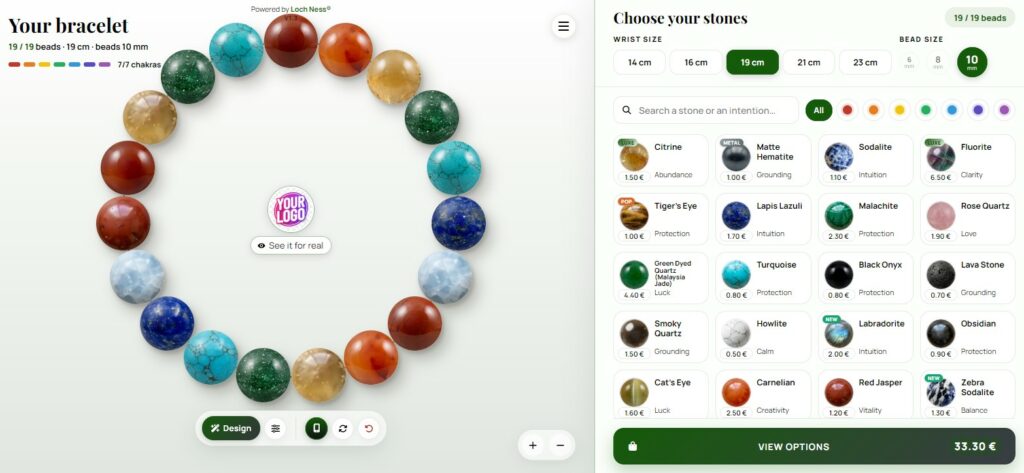
Leisti savo klientams sudaryti savo akmeninį apyrankį jūsų WordPress parduotuvėje nereikia kūrėjo. Loch Ness papildinys prideda apyrankės konstruktorių į jūsų pasirinktos puslapio dalį, jūsų prekės ženklo spalvomis, per kelias minutes.
Ką daro papildinys
Jis rodoma papulstirio kūrėjas, kuriame įterpiate jo trumpą kodą. Jūsų lankytojai pasirenka akmeniskus, realiuoju laiku stebėdami, kaip sudaroma papulstire, ir sužino kiekvieno akmens reikšmę. Kai papulstire baigtas, jie jums išsiunčia užsakymą tiesiai per el. paštą.
Įdiegkite jį 4 žingsniais
- Atsisiųskite papildinį. Atsisiųskite .zip failą žemiau.
- Įkelkite tai į „WordPress". Jūsų administravimo panelėje eikite į Plugins → Add New → Upload Plugin, pasirinkite failą, tada spustelėkite Install Now ir Activate.
- Įveskite savo identifikatorių. Atidarykite naują "Loch Ness Composer" meniu ir įveskite identifikatorių, gautą su jūsų sąranka.
- Įdėkite trumpąjį kodą. Įklijuokite [composeur_lochness] bet kuriame puslapyje arba poste, tada publikuokite.
[composeur_lochness] rodomas jūsų personalizuotas konstruktorius; [composeur_lochness_demo] rodo nemokamą demonstraciją, visada prieinamą.Dvikalbis ir reagus
Konstruktorius kalba jūsų svetainės kalba (Prancūzų arba Anglų) ir pritaikomas bet kuriam ekranui. Aukštis staliniam kompiuteriui ir mobiliajam telefonui, maksimalus plotis ir kadro spalva yra reguliuojami iš papildinės nustatymų.
Konstruktorius yra hostinamas ir prižiūrimas „Loch Ness". Aktyvi prenumerata rodo jūsų personalizuotą versiją; demonstracinė versija lieka nemokama.
Dažniausiai užduodami klausimai
Ar tai veikia be WooCommerce?
Taip. Priedas veikia bet kurioje WordPress svetainėje. Naudojant WooCommerce, jūs toliau tvarkysite mokėjimus ir siuntimą kaip įprastai: užsakymai iš konstruktoriaus pasiekia jus el. paštu.
Kuri kalba rodoma?
Įskiepis nustato jūsų svetainės kalbą: prancūzų kalbą prancūzkalbiams svetainėms, anglų kalbą visoms kitoms. Jokių nustatymų nereikia.
Ar galiu keisti konstruktoriaus dydį?
Taip. Papildinio nustatymuose reguliuokite aukštį desktopu ir mobiliajame įrenginyje, maksimalų plotį ir kadro spalvą.
Ar galiu tai parodyti prieš prenumeruojant?
Taip. [composeur_lochness_demo] trumpasis kodas rodo nemokamą demonstracinę versiją, idealią norint išbandyti konstruktorių jūsų svetainėje.

Parašė Camille G., „Loch Ness" steigėjas. Nuo 2013 iki 2023 metų projektavau simbolinį papuošalą savo prekės ženklui, o nuo tada visą laiką kuriu žiniatinklio programas ir įrankius. Šią apyrankės konstruktorių programavau pats. Moja istorija · GitHub · ORCID
Jūsų apyrankės kūrėjas „WooCommerce"
Gaukite savo identifikatorių su pritaikytu pasiūlymu, atsakytą per 48 valandas.
Gauti mano pritaikytą pasiūlymą Susipažinkite su apyrankės konstruktoriumi