
You sell loose leaf tea and you would like your customers to create their own blend on your website: choose the ingredients, set the proportions, see the result and order it. This page answers the questions tea shops ask before adding a custom tea blend builder: what customers see, how prices are calculated, how orders reach you, and how each blend can bring you search traffic.
How can customers create their own tea blend on my website?
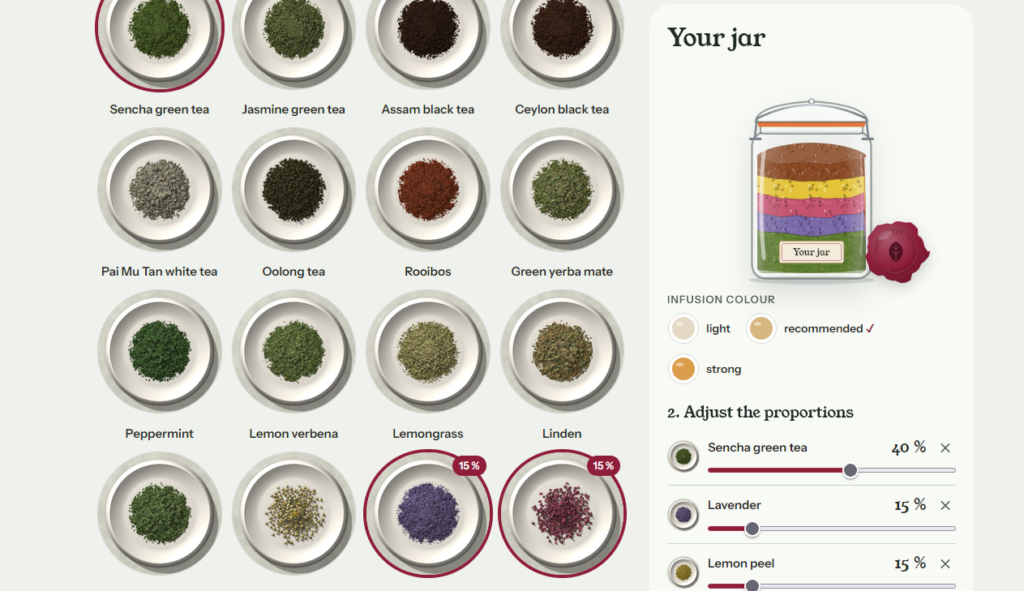
With a blend builder on a page of your site: the customer picks up to five ingredients, adjusts each percentage, and sees the blend take shape in a jar. Every ingredient adds a coloured layer, from the tea base at the bottom to flowers, fruit and spices on top, and the cup takes the colour of the infusion. The customer can also choose a moment for the blend: morning, afternoon, evening, iced and summer, cozy and winter, or sweet treat.
What does the customer learn about their blend?
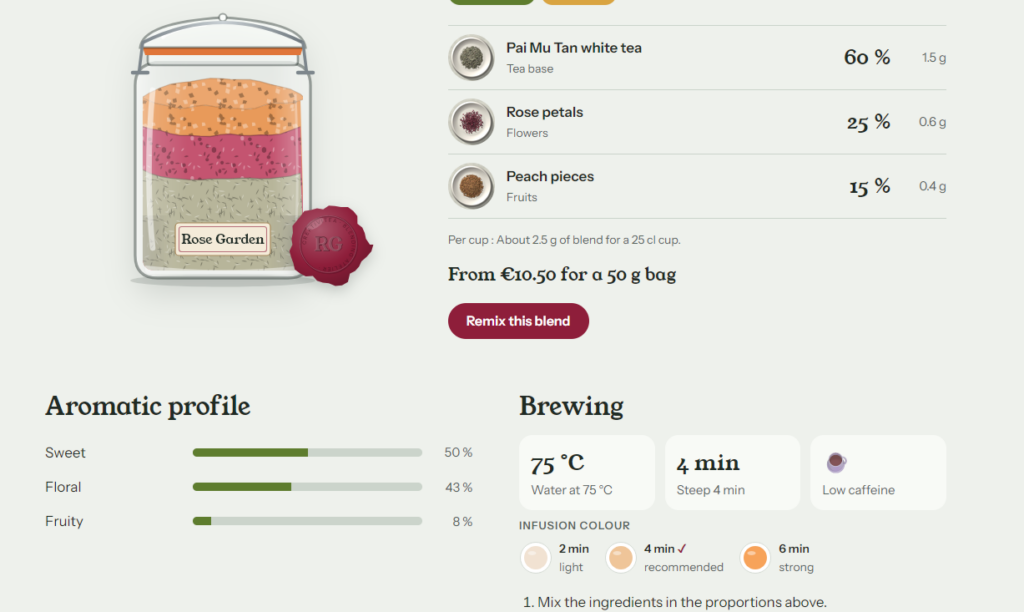
Each blend comes with its own data sheet, calculated from the recipe: aroma profile, caffeine level, brewing temperature and time, and grams of each ingredient per cup. A customer who mixes sencha, lemongrass and ginger sees straight away whether the blend is fresh or spicy, how much caffeine to expect and how to brew it. This is the kind of guidance a tea shop gives at the counter, available online at any hour.
- Aroma profile across 12 notes, such as fresh, citrus, floral, spicy, malty or roasted;
- Caffeine level, from caffeine-free to high, weighted by each ingredient’s share;
- Brewing guide based on the main tea base: water temperature and steeping time;
- Recipe in grams for one cup and for 100 g, so the blend can be prepared exactly.
Can I stop customers from creating blends that do not work?
Yes: every blend needs a real body, with at least 30% tea, rooibos, mate or herbs for infusion. A recipe made only of cinnamon and cocoa nibs is refused with a clear message, before it reaches you. Proportions move in steps of 5% and always add up to 100%, so every recipe can be weighed and prepared.
Which ingredients can I offer?
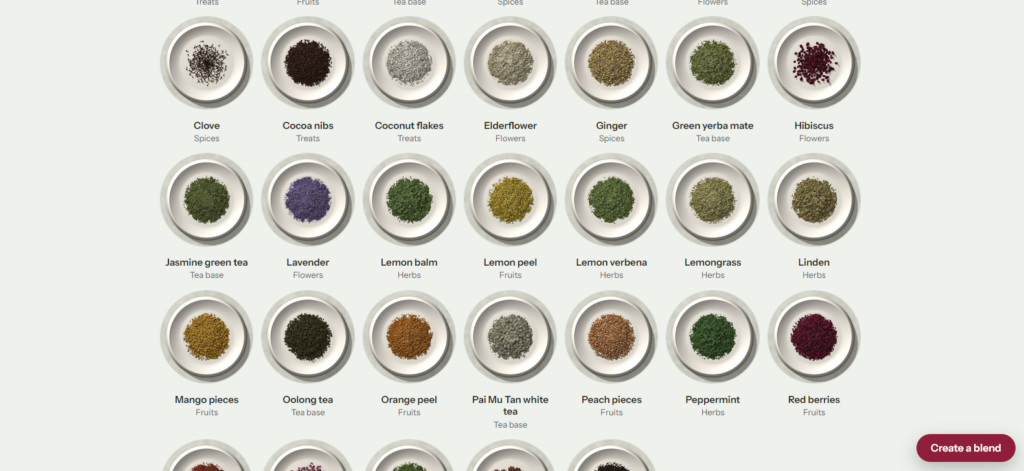
Your own: the builder uses your list of ingredients, organised in six families. The demo version includes 33 ingredients, which gives an idea of the range:
| Family | Examples in the demo |
|---|---|
| Tea base | Sencha, jasmine green tea, Assam, Ceylon, Pai Mu Tan, oolong, rooibos, green yerba mate |
| Herbs | Peppermint, lemon verbena, lemongrass, linden, lemon balm |
| Flowers | Chamomile, lavender, rose petals, hibiscus, elderflower |
| Fruit | Lemon peel, orange peel, apple, red berries, peach, mango |
| Spices | Ginger, cinnamon, cardamom, clove, star anise |
| Gourmand | Vanilla, cocoa nibs, coconut flakes, almond pieces |
Each ingredient has its own photo, the colour of its dry leaves and the colour of its infusion, so the jar and the cup look like your teas.
How is the price of a custom tea blend calculated?
By weight: you set a price per 100 g for each ingredient and a price for each jar size, and the builder calculates the blend price from its recipe. The customer sees the price update live for each format, for example 50 g, 100 g and 250 g. When an order request is sent, the price is calculated again on the server from the recipe, so a price changed in the browser is never taken into account.
How do custom blend orders reach me?
As an order request: the customer chooses a jar size, leaves their name and email, and you receive the full recipe with its price. Each request is also saved in your admin before the email is sent, so none gets lost. You then confirm with your customer and take payment with your usual tools: nothing is paid inside the builder, and you keep control of your stock and your delivery terms.
Can each customer blend bring traffic from Google?
Yes, and this is what sets this builder apart: each blend can become its own page, linked to the pages of its ingredients and its moment. A blend of rooibos, vanilla and cinnamon gets a page with its recipe, its aroma profile and its brewing guide. Ingredient pages show what customers actually pair together, such as the share of peppermint blends that also contain lemon peel, calculated from real compositions.
To avoid filling your site with thin pages, a customer blend stays out of search results until several different visitors have created it, or until you have written your own note about it. Your house blends are indexed from the start, and you can write your tasting notes on any page from the admin.
How is it different from a custom blend app with product options?
Product option apps add drop-down menus to a product page; this builder lets the customer see, understand and name their blend. Both approaches have their place:
| Product options app | This blend builder | |
|---|---|---|
| What the customer sees | Lists of options on a product page | A jar filling layer by layer and the colour of the cup |
| Guidance | Ingredient names and prices | Aroma profile, caffeine level, brewing guide, recipe per cup |
| Search traffic | One product page | A page per blend, ingredient and moment, with indexing rules |
| Checkout | Added to the cart of your store | Order request by email, payment with your usual tools |
If adding custom blends straight to your cart matters most to you today, an options app built for your platform may suit you better. If you want blending to be an experience that your customers enjoy and share, this builder is made for that.
Does it work with Shopify, WooCommerce or Wix?
It works alongside any website: you open it from a link or button in your menu, or embed it in a page. The builder runs in English, French and Spanish today, on phones as well as computers. Multi-currency, STRIPE integration, your logo, your brands, your colors, your design, your language (international)… On-demand options.
Who makes this tea blend builder?
I’m Camille, a jewellery designer and full-stack developer based in Paris. I first built a crystal bracelet builder for my own jewellery, then used the same approach for tea: let people create, see and understand what they compose. I write the code and set up each shop’s version myself, so you talk directly to the person who makes it.
Try the tea blend builder
Create a blend in the demo, then tell me about your shop, your teas and your language: I will prepare a version that looks and reads like your own.