For shops · FAQ
Everything about your white label custom beaded bracelet builder
Setup, customization, quote, orders: the answers shop owners ask for most often. A question isn’t here? Ask it in your quote request.
The principle
What is the bracelet builder?
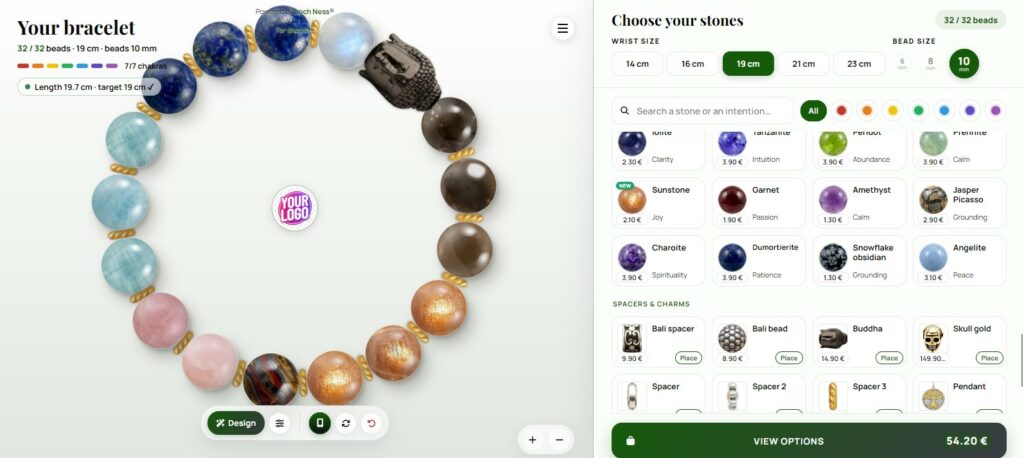
A crystal bracelet builder your customers use in their browser, on computer, phone or tablet. They compose bead by bead, see the price in real time and send you their order. It can also be installed as an app on their home screen.
What does “white label” mean?
The builder appears entirely in your colors, under your name and on your own web address. Your customers never see our brand, from the first bead to the order confirmation email.
Do I need to host or install anything?
No server, no software, no updates on your side. We handle hosting, security (HTTPS) and improvements. You only add a DNS record, or the plugin or module of your platform.
Customization
What can I customize?
Your shop name, your logo, your colors, the price of each bead, the stones you don’t want to offer and your domain name. Anything you don’t specify keeps a carefully designed default.
Can I change my colors, prices or logo later?
Yes, at any time. Send us the changes and they are applied without interruption for your customers.
Will updates overwrite my settings?
No. Your configuration (name, colors, prices, logo, order reception) is independent from the builder’s updates. Your customers get improvements automatically, and your customization stays as it is.
Quote and pricing
How much does the bracelet builder cost?
Every shop is different, so every quote is tailored. It depends on your platform, the languages you need, the features you choose and any custom development.
How fast do I get my quote?
Within 48 hours. Send your needs through the quote form and you receive a clear proposal, with no commitment.
Can you develop a feature specific to my brand?
Yes. The builder is developed in-house: a feature specific to your shop can be studied and included in your quote.
Getting started
What do I need to do on my side?
Three things: create a DNS record that points your subdomain to our server (we give you the exact value), create a free Web3Forms key with the email address that should receive your orders, and send us your branding (name, logo, colors, prices, stones to hide).
How long until the builder is live?
Once we have your details and your DNS record is in place, setup on our side is quick. The main delay is DNS propagation: often a few minutes to a few hours, 48 hours at most.
I use Cloudflare: is there anything to do?
A small encryption setting may be needed (SSL mode “Full”). We check it together during setup. Without Cloudflare, there is nothing special to do.
Orders and security
Where do my customers’ orders go?
Directly to your inbox, through the Web3Forms key you create with your own email address. Each order includes the full composition and price, ready to prepare.
Is the builder secure (HTTPS)?
Yes, always. The security certificate is generated and renewed automatically on our side: you have nothing to manage.
Can my customers install the builder like an app?
Yes. On mobile and desktop, a button lets them add it to their home screen and use it like a real app.

Written by Camille G., founder of Loch Ness. I designed symbolic jewelry for my own brand from 2013 to 2023, and I have been building web apps and tools full-time since. I code this bracelet builder myself. My story · GitHub · ORCID
Still have a question?
Ask it with your quote request: we answer within 48 hours.
Get my tailored quote Discover the bracelet builder